DOCUMENTS
CARDS IN WORD HLD


PRINTING TIPS
LLaminating
If you have the capability, laminating the documents marked with an L gives a much greater chance they will be kept by the recipient.
If you laminate the one-page guide, each needs to be folded so the edges of the paper line up, held tightly or clipped with a large potato chip bag clip or similar, then rolled with a rolling pin or similar. Then clipping 10 or so together and heating the edge with a hair dryer for 10-15 seconds results in a flat fold.
The edges (5-10 at a time) can be fanned over a range element as well to heat them before re-creasing by hand or with a roller, and will result in a flat product.
DDouble-Sided Printing
Double-sided printing, of course, uses less paper.
HLDCards
These print as double-sided, business-card-sized handouts. It is best to use at least 32-pound paper. Laminating will result in them lasting longer and more people keeping them.
Do a test run on one sheet to make sure that the left and right margins line up on both sides on your printer. If they don't, you can adjust them in "Margins." Change the left margin perhaps 3/100" at a time to start and retest.
QRQR Codes
QR code that appears on the card. Each links to applicable resources online.
Sheet Protectors
For documents with too many pages to staple, sheet protectors like this are about 10 cents each.
BMaking a Book in Word
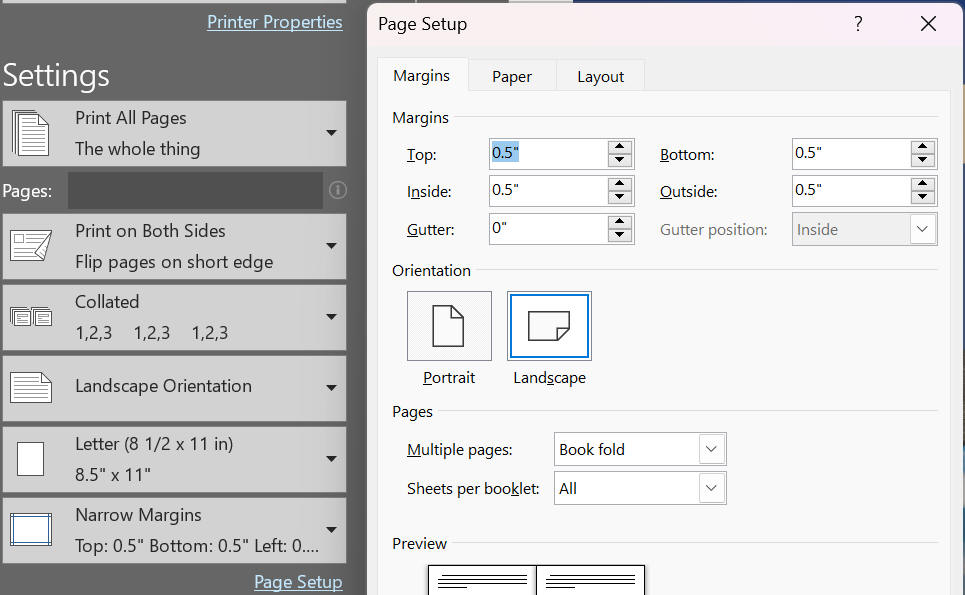
Use the following setup to create a book in Word. Click "Page Setup" to select "Book fold."
Printing One Guide?
Select the guide in Word or the page in PDF, and when printing, choose "Print Selection."